Most practice software was built for a desk. Your day happens in barn aisles and truck cabs: a horse on the cross ties, one bar of signal, and the next appointment forty minutes down the road.
We built the WWC Bodywork App alongside equine bodyworkers and chiropractors who’d used other software. They kept running into the same problems: reports took too long to write, the app was buggy and lost their work, and it wasn’t made for life on the move. Here’s what to look for so your next app fixes that instead of adding to it.
The checklist
0 of 10 in your app
Your ticks stay in this browser, so you can come back to the list.
Why do bodyworkers give up on their software?
Short answer
Usually because it costs them time. Reports take too long to write, the app freezes or loses work, and it needs a strong signal most barns don’t have. Software that fights you at the barn gets put off until night, and then it gets skipped.
A report you write at nine at night is a report written from memory. The details that matter at the next visit, like which side was tight or how the horse took the work, are freshest while you’re still standing next to the horse.
So the test for any app is simple: can you finish the report before you leave the barn? If the answer is no, it turns into homework.
How long should a session report take?
Short answer
A few minutes, at the barn. The app should let you tap what you do on most visits, like the reason for the visit, the spots you worked and your usual aftercare, and type only what’s new about this horse.
Count the screens and the typing a routine follow-up takes. Reasons for the visit, like pain and tension, maintenance or event prep, should be one tap each. So should the areas you worked and the aftercare you give most horses.
Notes still matter. What the owner told you, what you felt and how the horse responded deserve your own words. The app should leave room for them without making you type the same sentence on every report.
For a real example: equine bodyworker Ashley Stockbridge used to save her session reports for the end of the day, working from text notes she sent herself. Now she writes them in the barn as each session ends, and a whole day’s reports take her less than 5 minutes. Read her story.
 With WWC: A report is a few short steps: visit, client and horse, subjective, objective, assessment and treatment, plan, and review. Reasons, spots and aftercare are taps.
Does it need to work without signal?
Short answer
Yes. Many barns have weak signal or none. The app should keep every change on your phone as you type and send it to your account when you’re back in range, so a dropped signal never costs you a report.
Ask what happens if you lose signal halfway through a report. If you lose the report, or the app won’t open, it wasn’t built for barn calls.
Ask what happens if your phone dies or you close the app by mistake, too. You should be able to open it again and pick up where you left off.
With WWC: Everything is kept on your phone the moment you type it, and the report syncs on its own when you have signal again.
How should it record where you worked?
Short answer
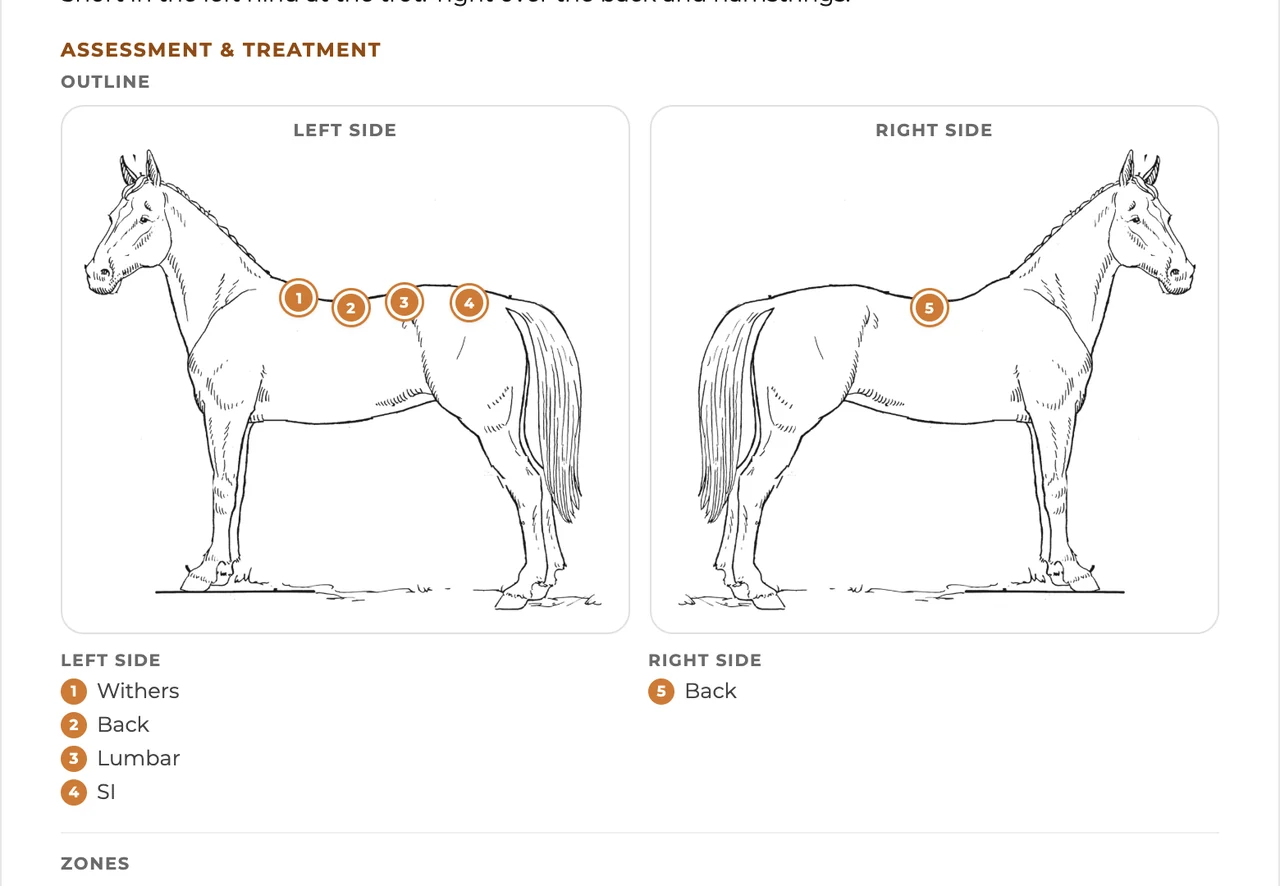
With a picture of the horse you can tap. Spots on both sides, larger areas, and a view of the back from above cover most visits. The report should show only the pictures you marked, so owners see exactly where you worked.
A marked picture says in a second what takes a paragraph to write. It’s also a quick refresher before the next visit: last time it was the left shoulder and the hamstrings.
It doesn’t need to be a detailed anatomy chart. Big, clear spots you can hit with your thumb at the barn are worth more than tiny labels you have to zoom in on.
With WWC: Mark on Outline (named spots, numbered left side first), Zones (whole areas that fill in) or Top view (the back from above). Only the pictures you mark go on the report.
What should each report include?
Short answer
The visit date and whether it’s a first visit, the reason for the visit, what the owner says, what you observed, where you worked and what you found, the plan and aftercare, when to see the horse next, and any photos or files.
That’s the familiar subjective, objective, assessment and plan order, and it keeps your reports the same from horse to horse. It also makes a horse’s history easy to read back: every visit in the same order, under the same headings.
For the next visit, a quick pick like 2, 4 or 6 weeks covers most horses. Leave room for your own words too, like “after the show.”
With WWC: Next visit is one tap for 1, 2, 4 or 6 weeks, or a line you type yourself.
How should aftercare work?
Short answer
Write each recommendation once, in your own words, and tap it onto any report. Owners should get your full wording, with a photo or link if it helps, not a one-word label.
Most bodyworkers give the same handful of recommendations: stretches, hand walking, a saddle fit check, a visit from the farrier or the chiropractor. Retyping them on every report is where a lot of time goes.
Write each one once with the detail an owner needs, like how often and when to stop. Then it’s one tap per report, and every owner gets the same clear instructions.
With WWC: Keep your own aftercare list, each with your wording, an optional photo and an optional link. Tap what each horse needs.
What should the horse owner get?
Short answer
A clean report with your logo and contact details that opens from a link, with no account to make and no app to download. You decide which reports get sent.
Owners don’t want another login. If they have to make an account to read your report, many won’t read it.
The report is also part of how owners see your business. Your logo, your contact details and a tidy layout say more about your work than a plain text message.
With WWC: Turn on “Email the report” on the last step. The owner opens it from a link with your logo and no login. Reports you don’t send are only seen by you.
Should it connect to your schedule and client list?
Short answer
Yes. Your clients, their horses and your upcoming visits should already be there when you start a report, so you’re not keeping two lists.
Separate apps for booking, client records and reports mean typing the same owner and horse into each one, then keeping them matched by hand.
When it’s all connected, a new client who books on your website is already in your client list when you start their first report.
With WWC: The app’s home screen shows the next two weeks of visits from Scheduling, and clients and horses come from your contacts.
Questions bodyworkers ask
Is the WWC Bodywork App free?
Yes. It’s a free add-on for equine bodyworkers on WWC. All of WWC is $39.99/month, one price for everyone.1
Does it work on a tablet or computer too?
Yes. It opens in the browser on your phone, tablet or computer, so you can write at the barn and look things over at home.
Can I change a report after I save it?
Yes. Open the report and edit it. Saved reports stay on the horse’s history.
Who can see my reports?
Only you, unless you send one. A sent report opens only from its own link.
 Written by the Western Web Co. team. We’re family owned and build WWC in Cave Creek, Arizona.